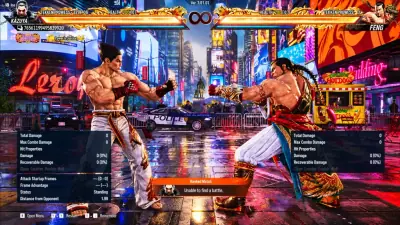
Frame data
Understand whose turn it is.
Frame data shows who recovers first after an exchange. Use it to understand when you can press and when you should keep guarding.
- Frame advantage
- Recovery timing
- Blocked attacks
Read frame data between exchanges, see where attacks reach and use combo assists for input sequences. Check Windows and Cloud DMA requirements before you buy.

Windows
Game platform
Frames
Timing readout
1 PC
Cloud DMA setup
Tickets
Order support
Tekken 8 features
See which tools explain an exchange and which help you enter a sequence.
Understand whose turn it is.
Frame data shows who recovers first after an exchange. Use it to understand when you can press and when you should keep guarding.
See an attack’s reach.
The hitbox display shows the area an attack covers. Use it to study why a strike connects at one distance and misses at another.
Keep move references close.
Use the move-list overlay as a reference when switching characters or looking up an input during practice.
Read the state of the round.
Follow Heat and Rage in the overlay. Heat opens offensive options such as Heat Smash. At low health, Rage makes Rage Art available.
Spot a chance to respond.
Punish information helps you recognize when recovery leaves an opening. Your counter still needs enough speed and reach to connect.
Recognize a missed strike.
A whiff is an attack that misses altogether. The whiff indicator helps you distinguish that opening from one created by a block.
Work with input sequences.
Combo assists help with the inputs that link moves together. Check supported sequences and modes before building a setup around a specific combo.
Check what your recording shows.
The product lists a mode for hiding the overlay from capture tools. Check the output in your recording software before sharing footage.
Choose what stays on screen.
The overlay sits apart from the game window. Use the menu controls to choose what to display in supported modes.
Store
Explore the game overlay and see what each separate utility is for.
See which tools show fight information and which assist with inputs.
See attack timing, hitbox coverage and punish openings in a separate Windows overlay.
A Windows utility for changing supported hardware identifiers.
Review identifier changes and the included cleaner. Confirm that your game is supported before ordering.
A Hyper-V setup on one Windows PC with guided installation.
Required for full functionality. The Cloud DMA workflow also requires separate GREENWARD, Static Server and AWS purchases.
A utility for changing cosmetic appearance in supported games.
Check the supported titles and cosmetic options with the seller before buying.
Product comparison
Check what the Tekken 8 product covers and what your Windows PC needs. Features and setup vary by provider.
Frame data
Read timing and recovery after an exchange.
Hitbox view
See the area an attack can reach.
Punish information
Review openings left by an attack’s recovery.
Combo assists
Get help with input sequences for supported combos.
Cloud DMA setup
Review the single-PC Hyper-V setup and its separate requirements before ordering.
Setup and order support
Use the seller’s ticket portal for Windows setup, license access and order questions.
PC
Windows compatibility
The game product lists Windows 10 and 11.
1 PC
Cloud DMA setup
Hyper-V runs on the gaming PC.
FAQ
Before checkout
Review required purchases and seller delivery.
Setup guide
Review Windows compatibility and the Cloud DMA requirements first. The seller provides your key and loader once the order is fulfilled.
Check your PC
Review the Cloud DMA requirements
Open your order and follow the guide
How it works
Review the full setup before checkout and use the seller’s current guide when your order arrives.
4 steps
Check compatibility
Compare your Windows edition, firmware settings and current game build with the listed requirements.
Review separate purchases
Check Cloud DMA, GREENWARD, Static Server and AWS before opening checkout.
Find your order
When the seller fulfills your order, find the key and loader link in the Orders tab.
Follow the current guide
Use the seller documentation and open a ticket if a setup step fails.
Blog
Tekken 8 guides on fight mechanics, buying decisions, Windows setup and account risk.
Learn to read who can act first after a hit or block and put the numbers to work in practice.
Learn how a missed attack creates a different opening from an attack you blocked.
Recognize when Heat and Rage change the options available during a round.
FAQ
Check Windows requirements, delivery and account risk.